


Since I already have my first database, let's get to work!
In this session, we’ll focus on creating our first PostgreSQL table, adding columns, and choosing the right data types for our data.
We’ll learn how to use the CREATE TABLE statement and understand how PostgreSQL handles different types of data, such as text, numbers, dates, and boolean values.
We’ll also explore some important constraints, including PRIMARY KEY, NOT NULL, UNIQUE, and DEFAULT, and see how they help us keep our data organized, consistent, and reliable.
By the end of this session, we’ll have our first properly structured table ready to work with. And then… we can finally start putting some data into it! 🚀
But before we start, what exactly is a data type?
A data type defines what kind of value a column can store. For example, a column containing a person's age should store a number, while a column containing their name should store text.
PostgreSQL provides many different data types, and choosing the right one is an important part of designing a database.
Let's create our TABLE with data:
For this example, we'll create simple users table. It will contain some basics information about each user, such as their name, email address, age, country and account status.
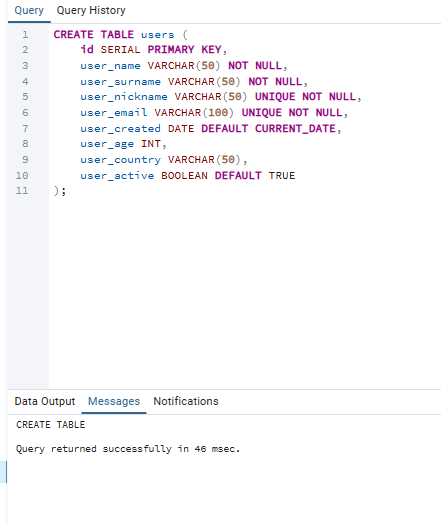
Let's break it down and see what each part does.
ID SERIAL PRIMARY KEY
The id column is used to uniquely identify every user in our table.
SERIAL automatically generates sequential numbers for new rows, making it convenient for creating unique IDs.
PRIMARY KEY means that every value in this column must be unique and cannot be NULL.
VARCHAR(50)
user_name VARCHAR(50)
VARCHAR is used to store text.
The number inside the brackets defines the maximum number of characters we allow.
For example, VARCHAR(50) allows us to store a string with up to 50 characters.
UNIQUE
UNIQUE menas that the value can't be duplicated.
This is useful for things such as usernames or email addresses.
For example, if we already have:
BigJohn12
user_nickname VARCHAR(50) UNIQUE NOT NULL
PostgreSQL will not allow another user to have the same nickname.
The same applies to:
user_email VARCHAR(100) UNIQUE NOT NULL,
Two users can not have the same email addresses.
DATE DEFAULT CURRENT_DATE
user_created DATE DEFAULT CURRENT_DATE,
This column stores the date when the user was created.
The interesings part here is:
DEFAULT CURRENT_DATE,
It tells PostgreSQL to automatically use the current date if we don't provide one ourselves.
So instead to writing:
INSERT INTO users (......, user_created)
VALUES (.....,'2026-09-12);
we can simply leave the column out, and PostgreSQL will automatically insert today's date.
INT
user_age INT,
INT is used to store whole numbers. In our example, it makes sense for the user's age: 25, 15, 42, 36 rather than values such as 25.5 or 36.7.
BOOLEAN
Finally, we have:
user_active BOOLEAN DEFAULT TRUE
BOOLEAN is used to store logical values: TRUE or FALSE.
We use it to determine whether the user's account is active.
Because we specified:
DEFAULT TRUE
every new user will automatically be considered active unless we explicitly set it to FALSE.
What does PostgreSQL do with this?
When we execute the query, PostgreSQL creates the table structure, but it doesn't create any users yet.
At this point, we have an empty table that looks conceptually like this:

Why do data types matter?
Choosing the correct data type is important when designing a database. It tells PostgreSQL what kind of values a column can store and helps prevent invalid data from being inserted.
The next step is to actually put some data into our new table.